


Tech companies moved to the cloud years ago, and most large enterprises have followed. Manufacturers, especially small and mid-sized ones, have taken longer, often because engineering and production data feels too critical to leave the building. That caution made sense in 2010. Today, the comparison has flipped: for most manufacturers, cloud computing delivers better security, faster deployment, and lower costs than servers in the back office. Here are the real benefits and risks of cloud computing, and how to weigh them.
📌 TL;DR
- Cloud software runs on remote servers. On-premise software runs on your own infrastructure.
- Cloud providers deliver stronger security than most manufacturers can afford in-house.
- Cloud deploys in weeks, scales in minutes, and updates automatically.
- Key risks include vendor dependence, connectivity, and data sovereignty, and all of them can be managed.
What is cloud computing
Cloud computing means running software and storing data on remote servers that you access over the internet. Google Docs is a cloud application. On-premise software, by contrast, runs on servers your company owns and operates, like a locally installed ERP or a file server in your plant.
Cloud computing popularized SaaS (software as a service): instead of buying a perpetual license, you pay a subscription and always use the current version. Cloud software is almost always sold as SaaS, while on-premise software can come either way.
The cloud has two main service levels:
- Infrastructure providers (AWS, Microsoft Azure, Google Cloud) rent storage and computing power that your IT team manages.
- Software publishers deliver ready-to-use applications and manage the servers and storage for you. Aletiq’s cloud PLM works this way.
Is cloud computing more secure than on-premise
For most manufacturers, yes. Security long held back cloud adoption, but the argument now runs the other way, for two reasons.
First, expertise. Cyber threats multiply every year, and IT systems keep getting more complex. An on-premise mail or file server needs constant monitoring and security patches at least monthly. Few manufacturers can keep that level of IT security expertise in-house when it sits far from their core business.
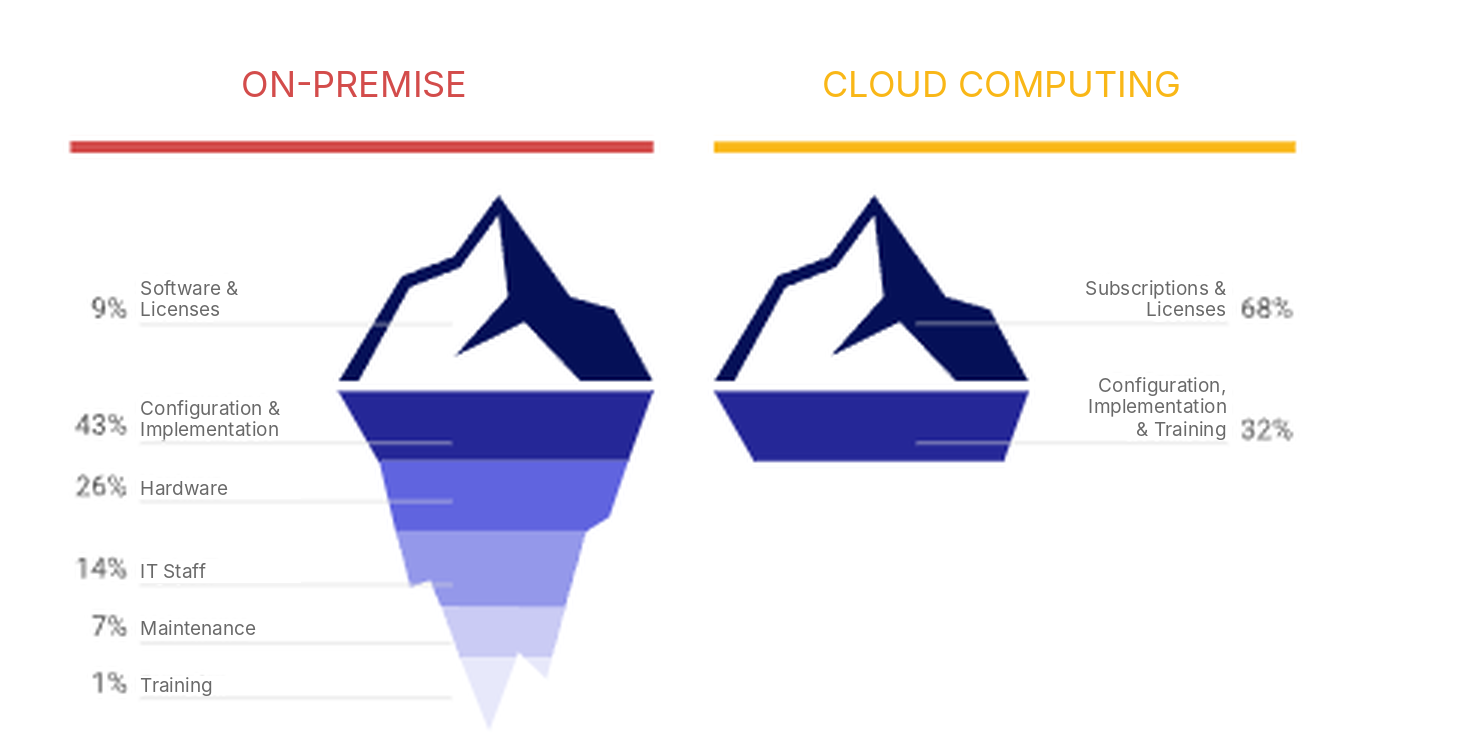
Second, cost. A secure on-premise setup requires a primary server, a backup server, server licenses, hardware maintenance, a climate-controlled server room with redundant power, and physical site security.
Cloud providers spread these costs across thousands of customers. That pooling buys recent hardware, continuous updates, 24/7 monitored data centers, guaranteed availability, and frequent backups at a price no single manufacturer could match. At Aletiq, for example, customer data is replicated 6 times across separate servers in distinct geographic zones, the platform is ISO 27001 certified, and the SLA guarantees 99.7 % availability with business resumption within 1 hour of an incident.
How long does it take to deploy cloud software
Cloud software deploys much faster because you install nothing on site. A cloud deployment takes three steps:
- Migrate your data and configure the application.
- Set up user access.
- Train your teams.
An on-premise deployment adds three more: auditing your existing hardware and buying new systems, installing and configuring the software on local servers, and training IT staff to run it. Those extra steps often stretch projects to a year or more.
The difference shows in the numbers. Moria, a medical device manufacturer, loaded about 12,000 documents and 10,000 SolidWorks files into Aletiq in 4 weeks, and its teams started training on site 4 weeks after kickoff.
How cloud computing makes scaling easier
The cloud adapts to your needs. Adding a server, removing a user account, or increasing computing power takes minutes.
Infrastructure providers like Microsoft Azure even rent servers by the hour. You can run a high-performance computing server for 4 hours overnight for simulations, or shut down data servers on weekends, then restart them in minutes. You pay only for what you use and cut energy consumption at the same time.
On-premise servers work the opposite way. You have to oversize them to absorb future growth, and replacing undersized hardware can cost more than the original investment.
Do cloud applications update automatically
Yes. Cloud software publishers ship updates continuously, and every user gets them at no extra cost. Because the publisher runs a small number of instances, it maintains them directly, so you always work on the latest version.
On-premise updates come bundled into new releases that you often have to buy, then reinstall and revalidate on your own servers. Many manufacturers end up running software that is several versions behind.
What are the risks of cloud computing
The cloud isn’t risk-free. These are the risks manufacturers raise most often, and how to manage each one:
- Vendor dependence: your data lives with a provider. Check that you can export all your data in standard formats, and review the contract’s exit terms before you sign.
- Internet connectivity: no connection means no access. Most plants already depend on connectivity for ERP and email, so a backup internet line usually covers this risk.
- Data sovereignty and compliance: some industries restrict where data can be stored. Ask where your provider hosts data and which certifications it holds (ISO 27001, SOC 2, or industry frameworks such as ITAR or CMMC for US defense).
- Shared responsibility: the provider secures the infrastructure, but your team still controls passwords, access rights, and user permissions. Enforce strong authentication and role-based access from day one.
- Long-term subscription cost: subscriptions add up over time. Compare total cost of ownership over 5 years, including the servers, licenses, upgrades, and IT time that on-premise requires.
At Aletiq, we believe these risks are a reason to choose a cloud provider carefully, not a reason to stay on-premise. A well-chosen provider handles infrastructure security better than almost any in-house team, and you keep control over who accesses your data.
Cloud vs. on-premise: which should manufacturers choose
The cloud gives each player the role it does best: infrastructure providers run the data centers, software publishers build and update the applications, and manufacturers focus on designing and building products. That specialization improves service quality and keeps IT costs under control, even as the number of connected systems and the volume of data keep growing.
For product data specifically, a cloud PLM like Aletiq gives engineering, quality, and production teams one secure, always up-to-date source of truth, without a server room or a 12-month rollout. Want to see what that looks like for your team? Book a demo.
FAQ
What is the difference between cloud and on-premise software
Cloud software runs on remote servers managed by a provider, and you access it through the internet. On-premise software runs on servers your company owns and maintains. Cloud is usually sold as a subscription, while on-premise often requires a perpetual license plus ongoing maintenance.
Is cloud computing safe for manufacturing data
Yes, when you choose a qualified provider. Certified cloud providers offer 24/7 monitoring, encryption, redundant backups, and continuous security updates that few manufacturers can match in-house. Check certifications such as ISO 27001 or SOC 2 and the provider’s hosting locations before you commit.
What are the main risks of cloud computing
The main risks are dependence on the vendor, reliance on internet connectivity, data sovereignty constraints, and misconfigured user access. You can manage each of them with data export guarantees, a backup connection, careful provider selection, and strong access controls.
Is cloud PLM cheaper than on-premise PLM
In most cases, yes, especially for small and mid-sized manufacturers. Cloud PLM removes the costs of servers, IT administration, and paid upgrades, and it deploys in weeks instead of months. Compare total cost of ownership over several years rather than license price alone.
How long does it take to implement a cloud PLM
A cloud PLM typically goes live in a few weeks, depending on how much data you migrate. With Aletiq, Moria loaded about 12,000 documents and 10,000 CAD files in 4 weeks. On-premise PLM projects often take a year or longer.


